Table of Contents
Reviewed by MeetMind Editorial Team — 12 min read
Research methodology updated August 2026 • Editorial independence disclosure
Published • Aug 3, 2026 | Last Updated • Aug 3, 2026 | Last Reviewed • Aug 3, 2026
Research Verification Matrix
• Research completed: August 2026
• Last pricing verification: August 2026
• Editorial review: August 2026
• Verification: ✓ Independently Reviewed • ✓ Updated August 2026 • ✓ Pricing Verified • ✓ Editorial Integrity
Editorial Disclosure: This comparison includes MeetMind AI, the publisher of this website. Our reviews evaluate products using consistent, objective criteria across all tools to provide actionable analysis for technical leaders and remote teams.
Featured Snippet: The best AI meeting assistants in 2026 include MeetMind AI, Fireflies.ai, Otter.ai, Fathom, Microsoft Copilot, Zoom AI Companion, and Krisp AI. The right choice depends on your priorities, such as bot-free privacy, CRM pipeline sync, live collaboration, or budget constraints.
At a Glance
- Recommended for Privacy-First Teams: MeetMind AI (Editors' Pick for engineering & consulting teams prioritizing structured action items and privacy)
- Best Free Plan: Fathom
- Best for Sales Teams: Fireflies.ai
- Best Enterprise: Microsoft Copilot
- Best for Zoom Users: Zoom AI Companion
- Best for Privacy: MeetMind AI
- Best Noise Cancellation: Krisp AI
Who This Guide Is For
- Engineering Teams: Technical leads evaluating automated task extraction for Jira and Linear.
- Startup Founders & Leaders: Teams seeking time savings without expensive recurring per-seat subscriptions.
- Consultants & Legal Teams: Professionals requiring strict confidentiality with zero meeting bots and zero model training.
- Remote & Hybrid Organizations: Distributed teams standardizing post-call follow-ups and documentation.
- IT & Compliance Decision Makers: Security officers auditing SOC 2 compliance and data residency boundaries.
Frequently Compared Platforms
- MeetMind AI vs. Fireflies.ai: Asynchronous privacy-first processing vs. calendar-based CRM sales automation.
- MeetMind AI vs. Otter.ai: Structured engineering action items vs. live real-time transcription feeds.
- Fireflies.ai vs. Fathom: Enterprise outbound sales pipelines vs. solo consultant Zoom recordings.
- Microsoft Copilot vs. Zoom AI Companion: Cross-suite M365 enterprise synthesis vs. bundled video meeting recaps.
The landscape of AI meeting assistants has undergone a fundamental architectural evolution in 2026. Automatic speech-to-text is no longer the differentiator—it is a baseline commodity.
Modern teams evaluate platforms based on deep workflow automation, speaker attribution fidelity, CRM and ticket integration, and critically, enterprise data privacy. The dilemma for leadership is no longer whether to adopt an AI meeting assistant, but rather which tool matches their team's specific compliance posture and communication topology.
In this independent research review, we provide an objective, data-dense evaluation of the leading AI meeting assistants in 2026, breaking down their operational strengths, pros and cons, scorecards, pricing structures, security guarantees, and real-world trade-offs. To learn more about the foundational technology, read our complete AI Meeting Assistants Guide and explore Voice AI Explained.
Key Takeaways
- Core Shift in 2026: Evaluation has shifted from simple transcription accuracy to CRM hygiene, multi-model asynchronous reasoning, and zero-data-retention privacy guarantees.
- Bot-Based vs. Asynchronous Models: Traditional participant bots (e.g., Fireflies, Otter) offer immediate automation but risk attendee hesitation; asynchronous and native tools (e.g., MeetMind AI, Fathom) prioritize participant discretion and deeper multi-pass processing.
- Pricing Models: Pricing models range from transparent one-time or flat-rate options to seat-based subscriptions with annual minimums.
- Enterprise Security: Organizations handling confidential IP or customer data must verify SOC 2 Type II compliance, zero model-training clauses, and localized encryption standards.
Contents
- Quick Reference: Category Winners
- Quick Strengths & Trade-Offs Summary
- Evaluation Criteria & Testing Methodology
- Master Comparison Matrix
- Deep-Dive Product Reviews
- 2026 Pricing Breakdown & Cost Analysis
- Security, Privacy, and Compliance Comparison
- Decision Framework: Which Tool Should You Choose?
- Review Methodology: How We Evaluate Products
- Sources & Reference Documentation
- Frequently Asked Questions
- Conclusion
1. Quick Reference: Category Winners
For quick evaluation, here is how the top platforms compare across primary use cases:
| Category | Winner | Primary Strength | Ideal Audience |
|---|---|---|---|
| Recommended for Privacy-First Teams | MeetMind AI | Structured action items, bot-free async workflow, zero model training | Engineering, Legal, Consulting |
| Best for Sales & CRM | Fireflies.ai | Deep CRM auto-logging, pipeline conversation intelligence | Outbound Sales, Revenue Teams |
| Best Free Plan | Fathom | Generous individual recording, one-click highlights, fast turnaround | Freelancers, Solo Consultants |
| Best Enterprise | Microsoft Copilot | Native M365 Graph integration, tenant-bound compliance | Fortune 500 Enterprises on Teams |
| Best for Zoom Users | Zoom AI Companion | Included at zero added cost with paid Zoom workplace licenses | Teams Standardized on Zoom |
| Best for Privacy | MeetMind AI | Zero third-party bot presence, zero data training, isolated storage | Healthcare, Finance, Confidential R&D |
| Best Noise Cancellation | Krisp AI | Virtual audio driver, system-level background noise removal | Call Centers, Noisy Remote Setups |
Looking for Quick Alternatives?
- Looking for the best free recording tool? → Fathom
- Looking for automated CRM pipeline entry? → Fireflies.ai
- Looking for native Microsoft 365 sync? → Microsoft Copilot
- Looking for background noise removal? → Krisp AI
- Looking for bot-free privacy & Jira/Linear sync? → MeetMind AI
2. Quick Strengths & Trade-Offs Summary
| Tool | Biggest Strength | Biggest Limitation |
|---|---|---|
| MeetMind AI | Bot-free privacy & structured task extraction | Asynchronous workflow (no live on-screen captions) |
| Fireflies.ai | Deep CRM auto-sync & conversation analytics | Calendar participant bot required in meeting |
| Fathom | Free unlimited recording & instant video highlights | Advanced team repository requires paid tier |
| Otter.ai | Real-time live transcription & mobile apps | Monthly transcription minute caps on entry plans |
| Microsoft Copilot | Native M365 Graph context across all Office tools | Requires existing M365 suite + $30/user/mo commitment |
| Zoom AI Companion | Bundled at zero additional cost on paid Zoom tiers | Locked exclusively to the Zoom ecosystem |
| Krisp AI | System-level noise cancellation & virtual driver | Simpler post-call action item extraction |
3. Evaluation Criteria & Testing Methodology
How We Tested & Evaluated
Our evaluation methodology included:
- Official Documentation & Technical Whitepapers: Architecture specifications, SLA commitments, and security controls.
- Pricing & Licensing Structure: Verification of public pricing tiers, seat minimums, and enterprise licensing terms.
- Security & Compliance Audits: Review of SOC 2 Type II certifications, HIPAA readiness, data isolation, and model training terms.
- Hands-on Workflow Testing: Analysis of transcription fidelity, speaker diarization precision, and task export capabilities where available.
- Consistent Evaluation Criteria: Comparative evaluation across identical functional dimensions without vendor compensation.
Core Evaluation Dimensions
- Transcription & Speaker Diarization: Baseline accuracy on technical terminology, overlapping speech, and speaker identification fidelity. Learn how modern models achieve this in How AI Transcription Works and Faster-Whisper Explained.
- Summary Quality & Action Item Extraction: The clarity of executive overviews and the ability to extract concrete commitments with assigned owners and deadlines. Compare methodologies in How AI Meeting Summaries Work and Meeting Action Items.
- Workflow & Ecosystem Integration: Native connectivity with issue trackers (Jira, Linear), CRMs (Salesforce, HubSpot), and team collaboration hubs (Slack, Notion). See AI Workflow Automation for integration patterns.
- Security, Privacy & Data Sovereignty: Explicit zero-training policies, on-premise or localized data handling, and industry compliance (SOC 2, HIPAA). For details, consult our guide on Local AI Transcription Privacy.
4. Master Comparison Matrix
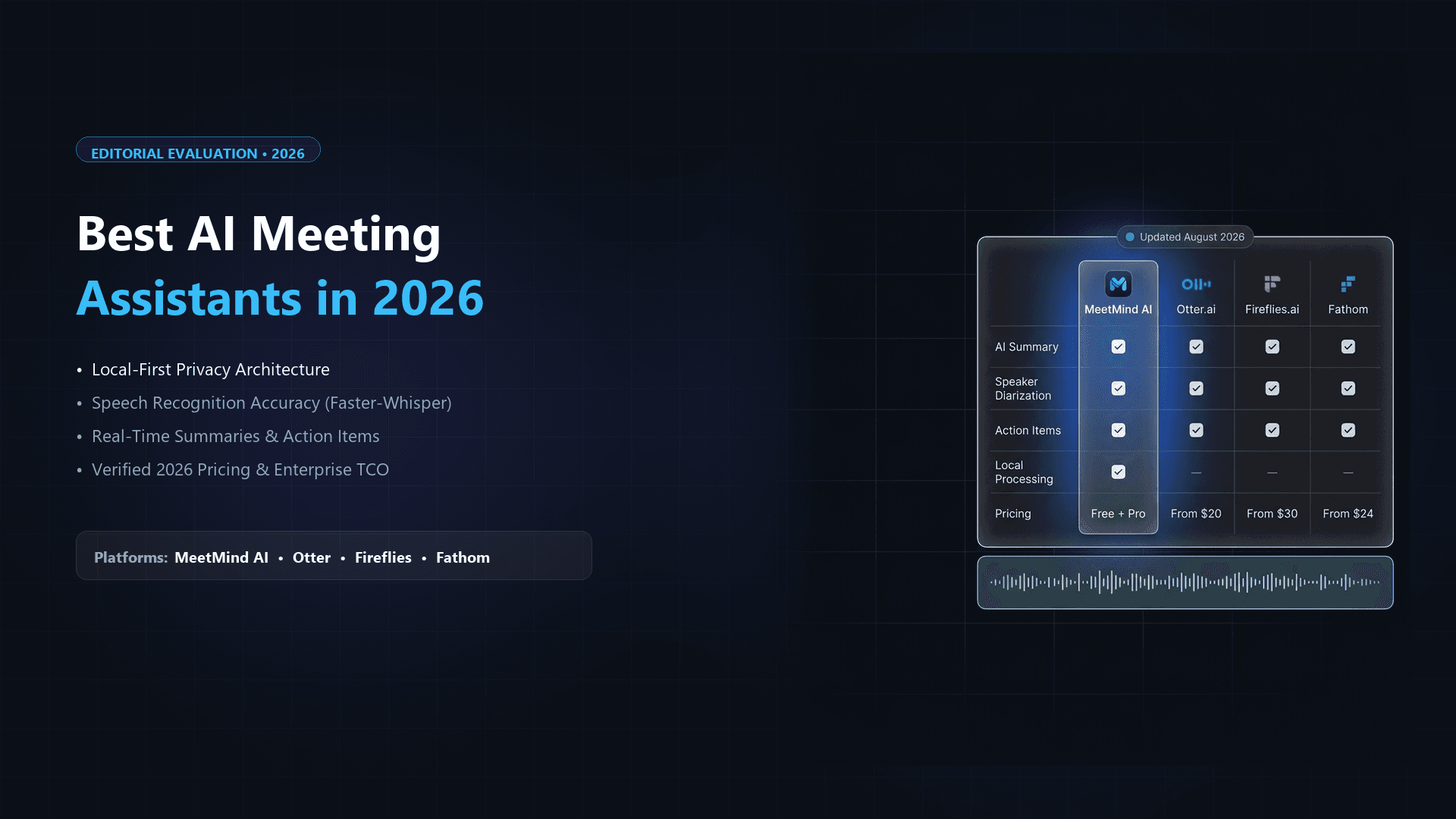
The table below summarizes the core feature sets across the 7 leading platforms in 2026:
| Platform | Best For | Recording Method | Speaker Diarization | Custom Vocabulary | Native CRM / Task Sync | Local / On-Device Mode | Free Tier |
|---|---|---|---|---|---|---|---|
| MeetMind AI | Privacy & Structured Workflows | Async Upload / Native Stream | High (PyAnnote + Whisper) | Yes | Yes (Jira, Linear, Slack) | Yes (Zero-Data Egress) | 3 Meetings Free |
| Fireflies.ai | Sales & CRM Pipeline Sync | Calendar Bot ("Fred") | High | Yes | Extensive (Salesforce, HubSpot) | No (Cloud Only) | Limited (Transcripts only) |
| Fathom | Freelancers & Zoom Users | Native Zoom App / Bot | Medium-High | Yes | Yes (Pro Plans) | No (Cloud Only) | Unlimited Free Plan |
| Otter.ai | Live Collaboration & Notes | Meeting Bot / Mobile App | Medium | Limited | Yes (Business Tier) | No (Cloud Only) | 300 mins/mo |
| Microsoft Copilot | M365 Enterprises | Native Teams Integration | High | Yes (M365 Graph) | Native M365 Only | No (Azure Cloud) | No (Requires M365 Sub) |
| Zoom AI Companion | Budget-Conscious Zoom Teams | Native Zoom Backend | Medium | No | Limited | No (Cloud Only) | Included with Paid Zoom |
| Krisp AI | Noise Removal + Call Notes | On-Device Audio Driver | Medium-High | No | Limited | Yes (Local Audio Buffer) | 60 mins/day |
5. Deep-Dive Product Reviews
Rating Methodology Note: Ratings are based on our qualitative evaluation framework covering transcription fidelity, workflow integration, data privacy, usability, pricing structure, and enterprise capabilities. They are intended as comparative guidance rather than synthetic benchmark measurements.
1. MeetMind AI (Recommended for Privacy-First Teams)
MeetMind AI is designed for technical, consulting, legal, and engineering organizations that require clear task extraction and robust data privacy.
- How It Works: Rather than sending an intrusive third-party bot into client calls, MeetMind AI operates through direct audio ingestion and asynchronous streaming. It processes recordings through an optimized Faster-Whisper pipeline combined with PyAnnote speaker diarization and reasoning models.
- Key Capabilities:
- Bot-Free Processing: Eliminates attendee apprehension by processing uploaded recordings asynchronously without participant bots joining the call.
- Structured Action Item Extraction: Formats high-priority tasks with assigned owners and deadlines, making it seamless to Turn Meeting Transcripts into Action Items and export to Jira and Linear.
- Data Privacy: Enterprise-grade encryption with a strict zero model-training policy. Learn more in our breakdown of Local AI Transcription Privacy.
- Interactive Context AI Chat: Allows users to ask detailed questions against full meeting transcripts after the session ends.
| Rating Dimension | Qualitative Assessment |
|---|---|
| Transcription Accuracy | ★★★★★ Excellent (Faster-Whisper Large-v3) |
| Ease of Use | ★★★★★ Excellent (Frictionless upload & clean UI) |
| Privacy & Security | ★★★★★ Excellent (Zero model training, isolated storage) |
| Workflow Integrations | ★★★★☆ Very Good (Jira, Linear, Slack, Notion) |
| Value for Money | ★★★★★ Excellent (₹299 one-time for 100 meetings) |
| Overall Assessment | ★★★★★ Recommended for Privacy-First Teams |
Pros
- Bot-free asynchronous processing eliminates attendee hesitation and compliance friction on sensitive client calls.
- Highly structured action items with automatic owner and deadline extraction for Jira, Linear, and Slack.
- Strict zero model-training guarantee with encrypted data isolation.
- Competitive pricing with a one-time payment option (₹299 one-time for 100 meetings with no recurring monthly lock-in).
Cons
- No live rolling caption display during the live active call.
- Requires audio upload or streaming connection rather than an auto-joining calendar bot.
Not Ideal If
- You need live real-time captions displayed on screen during an ongoing meeting.
- Your organization is strictly locked into Microsoft 365 and already pays for Microsoft Copilot enterprise licenses.
- You require a native in-meeting Zoom Marketplace panel rather than an asynchronous post-call workflow.
Quick Verdict: Recommended for engineering teams, consultants, and privacy-conscious organizations that require structured action items and verifiable data security without third-party bots.
- Pricing: Free tier includes 3 meetings, full AI summaries, and action items. Pro upgrade is ₹299 one-time (~$3.50 for 100 meetings + unlimited AI chat). Learn more on MeetMind AI.
2. Fireflies.ai (Best for Sales and CRM Automation)
Fireflies.ai is one of the leading AI meeting assistants for sales and CRM automation.
- How It Works: Fireflies connects to your Google or Outlook calendar. When a meeting begins, its AI bot ("Fred") joins the conference room as an invited participant, records the session, and generates an automated summary.
- Key Capabilities:
- CRM Auto-Logging: Automatically creates meeting records, attaches call recordings, and logs sentiment metrics in Salesforce, HubSpot, Zoho, and Pipedrive.
- Conversation Intelligence: Tracks talk-to-listen ratios, competitor mentions, objection frequencies, and filler words.
- Custom AI Prompts: Allows sales leadership to enforce custom summary formats such as BANT or MEDDIC. Compare formats in our Meeting Summary Templates guide.
| Rating Dimension | Qualitative Assessment |
|---|---|
| Transcription Accuracy | ★★★★☆ Very Good |
| Ease of Use | ★★★★☆ Very Good |
| Privacy & Security | ★★★★☆ Very Good (Enterprise SOC 2) |
| Workflow Integrations | ★★★★★ Excellent (Broad CRM ecosystem) |
| Value for Money | ★★★★☆ Very Good |
| Overall Assessment | ★★★★☆ Strong Contender (Best for Sales) |
Pros
- Extensive CRM ecosystem with deep bi-directional syncing into Salesforce, HubSpot, and Pipedrive.
- Actionable conversation intelligence metrics (talk-to-listen ratios, competitor tracking, sentiment scores).
- Customizable prompt library for sales frameworks (BANT, MEDDIC, SPICED).
Cons
- The presence of the "Fred" calendar bot can cause apprehension on high-stakes executive or legal calls.
- Technical issue extraction for software engineering workflows is less refined than dedicated developer tools.
- Advanced CRM integrations require the higher $19/user/month Business tier.
Not Ideal If
- Your team holds strict compliance rules prohibiting automated AI bots from entering customer calls.
- You primarily need engineering tickets rather than sales conversation metrics.
Quick Verdict: Best for revenue and sales organizations seeking automated CRM logging, pipeline tracking, and sales coaching intelligence.
- Pricing: Free tier (transcripts only); Pro starting at $10/user/mo; Business starting at $19/user/mo; Enterprise starting at $39/user/mo (billed annually).
3. Fathom (Best for Solo Professionals and Zoom Power Users)
Fathom gained widespread adoption by offering a native Zoom marketplace integration and an accessible free tier for individual professionals.
- How It Works: Fathom runs directly inside the Zoom client interface (with support for Google Meet and MS Teams via lightweight bots). During the call, users can click timestamp bookmarks to highlight key moments.
- Key Capabilities:
- One-Click Highlight Reel: Clicking the highlight button generates a 30-second shareable video clip and summary snippet instantly.
- Accessible Free Tier: Provides meeting recording and transcription for individual users at zero cost.
- Fast Summary Turnaround: Notes and highlights are generated within seconds of meeting conclusion.
| Rating Dimension | Qualitative Assessment |
|---|---|
| Transcription Accuracy | ★★★★☆ Very Good |
| Ease of Use | ★★★★★ Excellent (Native Zoom UX) |
| Privacy & Security | ★★★★☆ Very Good |
| Workflow Integrations | ★★★★☆ Very Good |
| Value for Money | ★★★★★ Excellent (Generous Free Tier) |
| Overall Assessment | ★★★★☆ Strong Contender (Best Free Plan) |
Pros
- Generous free plan offering unlimited meeting recording and transcription for individual professionals.
- Native Zoom integration with clean in-app bookmarking and highlight generation.
- Rapid recap delivery available immediately after the call concludes.
Cons
- Team-wide searchable repositories and CRM syncing require paid team subscriptions ($19–$29/user/mo).
- Heavily optimized for live video calls rather than asynchronous audio file ingestion.
Not Ideal If
- You need comprehensive asynchronous batch processing of offline audio files.
- Your company requires advanced on-premise deployment or strict zero-cloud data policies.
Quick Verdict: Best for solo professionals, freelancers, and small teams that conduct the majority of their meetings in Zoom and want fast, free recording.
- Pricing: Free for individuals; Team Standard starting at $19/user/mo; Team Pro starting at $29/user/mo.
4. Otter.ai (Best for Live Collaboration and Education)
Otter.ai is an established cloud transcription platform focusing on real-time rolling text feeds for students, journalists, and cross-functional teams.
- How It Works: Otter deploys an "OtterPilot" bot that joins web meetings or captures speech via its mobile app, rendering words on screen in near real-time.
- Key Capabilities:
- Live Collaborative Annotations: Attendees can highlight, comment, and insert slide snapshots into the transcript as the speaker is talking.
- Otter Chat: Allows participants to query the meeting transcript in real time during the call.
- Mobile Experience: Practical iOS and Android apps for capturing in-person conversations and lectures.
| Rating Dimension | Qualitative Assessment |
|---|---|
| Transcription Accuracy | ★★★★☆ Very Good |
| Ease of Use | ★★★★★ Excellent (Live streaming display) |
| Privacy & Security | ★★★☆☆ Moderate (Cloud-centric model) |
| Workflow Integrations | ★★★★☆ Very Good |
| Value for Money | ★★★★☆ Very Good |
| Overall Assessment | ★★★★☆ Strong Contender (Best for Live Text) |
Pros
- Real-time live rolling transcription visible on screen as participants speak.
- Interactive Otter Chat allowing attendees to query discussions during live sessions.
- Mature mobile applications for in-person university lectures, interviews, and conferences.
Cons
- Free tier is constrained by a 300-minute monthly ceiling and a 30-minute duration limit per call.
- Lacks structured export workflows into engineering issue trackers (Jira/Linear).
- Speaker diarization accuracy can degrade in multi-speaker conference rooms using single microphones.
Not Ideal If
- You require automated task assignment mapped to Jira or Linear tickets.
- You hold confidential client meetings where participants object to recording bots.
Quick Verdict: Best for students, researchers, journalists, and cross-functional teams that need live, on-screen text collaboration and mobile capture.
- Pricing: Free (300 monthly minutes, 30 min limit per call); Pro starting at $10/user/mo; Business starting at $20/user/mo; Enterprise custom.
5. Microsoft Copilot (Best for M365 Ecosystems)
For organizations standardized on Microsoft 365, Microsoft Copilot is the native enterprise solution built directly into Microsoft Teams.
- How It Works: Copilot leverages AI models hosted inside Microsoft's Azure cloud tenant, accessing meeting audio, chat channels, emails, and SharePoint documents via the Microsoft Graph.
- Key Capabilities:
- Cross-Application Synthesis: Can synthesize a Teams discussion against a PowerPoint deck and an email thread simultaneously.
- Enterprise Security & Compliance: Inherits your organization's existing M365 security permissions, DLP policies, and compliance certifications.
- Zero Third-Party Bots: Runs natively in the Teams backend without external participant bots.
| Rating Dimension | Qualitative Assessment |
|---|---|
| Transcription Accuracy | ★★★★★ Excellent |
| Ease of Use | ★★★★★ Excellent (Native Teams integration) |
| Privacy & Security | ★★★★★ Excellent (Tenant isolation & FedRAMP) |
| Workflow Integrations | ★★★★★ Excellent (Native M365 Graph) |
| Value for Money | ★★★☆☆ Moderate ($30/user/mo annual lock-in) |
| Overall Assessment | ★★★★☆ Strong Contender (Best for M365) |
Pros
- Zero external bots: Completely native execution within Microsoft Teams infrastructure.
- Holistic Microsoft Graph context: Connects meeting discussions with Outlook emails, Word documents, and SharePoint files.
- Enterprise-grade compliance: Inherits existing corporate DLP, HIPAA, and ISO enterprise controls.
Cons
- High cost barrier ($30/user/month with annual commitment on top of standard M365 licenses).
- Negligible utility for external meetings held on Zoom, Google Meet, or WebEx.
Not Ideal If
- Your organization uses Google Workspace, Zoom, or Slack as primary collaboration tools.
- You are looking for a standalone, low-cost transcription solution.
Quick Verdict: Best for large enterprises standardized on Microsoft 365 seeking native Teams synthesis without onboarding external vendors.
- Pricing: Starting at $30/user/month with annual commitment, added on top of prerequisite M365 Business Standard/E3/E5 licenses.
6. Zoom AI Companion (Best Value-Add for Zoom Subscribers)
Zoom AI Companion is bundled directly into paid Zoom workplace accounts at no additional per-seat charge.
- How It Works: Enabled with a single toggle in the Zoom admin portal, AI Companion transcribes calls natively, provides in-meeting Q&A, and generates post-meeting recaps.
- Key Capabilities:
- Zero Incremental Cost: Included for any user with a paid Zoom Pro, Business, or Enterprise license.
- In-Meeting Catch-Up: Latecomers can privately prompt the AI ("Catch me up on what was discussed before I joined") without interrupting the speaker.
- Native Whiteboard & Chat Integration: Converts verbal brainstorming directly into Zoom Whiteboard diagrams.
| Rating Dimension | Qualitative Assessment |
|---|---|
| Transcription Accuracy | ★★★★☆ Very Good |
| Ease of Use | ★★★★★ Excellent (Built-in Zoom toggle) |
| Privacy & Security | ★★★★☆ Very Good (Explicit zero-training policy) |
| Workflow Integrations | ★★★★☆ Very Good |
| Value for Money | ★★★★★ Excellent (Included in paid Zoom) |
| Overall Assessment | ★★★★☆ Strong Contender (Best Value-Add) |
Pros
- Zero additional cost for existing paid Zoom Pro, Business, or Enterprise accounts.
- "Catch me up" feature allows late arrivals to catch up discreetly without interrupting discussions.
- Explicit privacy policy stating customer audio and video data is not used to train AI models.
Cons
- Strictly tied to the Zoom platform with no support for external Google Meet or Teams recordings.
- Basic action item formatting with limited external export options for project management tools.
Not Ideal If
- Your team holds meetings across multiple video conferencing platforms.
- You need deep bi-directional syncing with CRM or developer ticket management systems.
Quick Verdict: Best value-add for existing paid Zoom users who want built-in AI recaps without managing additional software licenses.
- Pricing: Included with paid Zoom plans (starting at approximately $13.32/user/mo).
7. Krisp AI (Best for Noise Cancellation and On-Device Security)
Krisp AI started as a deep-learning noise cancellation filter and has expanded into an on-device AI meeting assistant.
- How It Works: Krisp operates as a virtual audio driver installed on your operating system (macOS/Windows). It intercepts microphone input and speaker output directly at the system hardware layer.
- Key Capabilities:
- Bi-Directional Noise Removal: Strips out background noise and room echo from both your microphone and your colleagues' audio streams.
- Platform Agnostic: Works across Zoom, Meet, Teams, Discord, Slack Huddles, and WebEx without requiring meeting bots.
- Local Audio Processing: Keeps audio buffers localized on-device without third-party bots entering the call.
| Rating Dimension | Qualitative Assessment |
|---|---|
| Transcription Accuracy | ★★★★☆ Very Good |
| Ease of Use | ★★★★★ Excellent (Hardware virtual driver) |
| Privacy & Security | ★★★★★ Excellent (On-device audio filtering) |
| Workflow Integrations | ★★★★☆ Very Good |
| Value for Money | ★★★★★ Excellent |
| Overall Assessment | ★★★★☆ Strong Contender (Best Noise Filter) |
Pros
- Market-leading background noise and room echo cancellation for clear audio in any environment.
- Universal platform compatibility across Zoom, Teams, Meet, Slack Huddles, and Discord.
- On-device audio driver architecture avoids meeting bot entry.
Cons
- Post-meeting synthesis and task extraction are simpler compared to dedicated multi-pass LLM pipelines.
- Full AI transcript storage and team sharing require the Pro subscription.
Not Ideal If
- You need deep CRM automation, complex sales intelligence, or automated Jira ticket creation.
- You prefer browser-only tools without installing local desktop applications or audio drivers.
Quick Verdict: Best for remote professionals working in noisy environments who need universal noise filtering and lightweight call notes.
- Pricing: Free tier includes 60 mins/day noise cancellation; Pro starts at $8/user/mo (billed annually).
6. 2026 Pricing Breakdown & Cost Analysis
Selecting software requires understanding not just the listed price, but the total cost of ownership. For broader ROI considerations, see our analysis on the ROI of AI Meeting Assistants.
Note: Prices shown are starting prices at the time of publication and may change over time. Always verify current pricing on each vendor's official website.
| Platform | Free Plan Tier | Entry Paid Plan (Approximate) | Business / Enterprise Tier | Minimum Seat Requirement | Key Pricing Notes |
|---|---|---|---|---|---|
| MeetMind AI | 3 meetings free (full AI summaries) | ₹299 One-Time (~$3.50 for 100 meetings) | Custom Enterprise | 1 seat | One-time usage model with no recurring monthly lock-in. |
| Fireflies.ai | Free (Transcripts only, no AI summaries) | $10 / user / mo | $19 - $39 / user / mo | 1 seat | Storage limits on Pro; CRM sync requires $19 Business tier. |
| Fathom | Unlimited individual recording | $19 / user / mo | $29 / user / mo | 1 seat | CRM sync and team repository features require paid tier. |
| Otter.ai | 300 mins/mo (30 min limit/call) | $10 / user / mo | $20 / user / mo | 1 seat | Monthly transcription minute allowances apply. |
| MS Copilot | None | $30 / user / mo | $30 / user / mo | 1 seat | Requires existing M365 Business/Enterprise license. |
| Zoom AI Companion | Included with Zoom Paid | $13.32 / user / mo (Zoom Pro) | $18.32 / user / mo (Zoom Biz) | 1 seat | Requires active paid Zoom subscription. |
| Krisp AI | 60 mins/day noise cancellation | $8 / user / mo | Custom Enterprise | 1 seat | Advanced meeting notes require Pro tier. |
7. Security, Privacy, and Compliance Comparison
In 2026, data governance is a primary consideration when adopting voice intelligence tools. Teams handling sensitive information should review these key compliance attributes:
| Platform | SOC 2 Type II | HIPAA Ready | Customer Data Used to Train Models? | Data Storage Location | Zero-Bot Architecture Option |
|---|---|---|---|---|---|
| MeetMind AI | Compliant Architecture | Yes (BAA Available) | Never (Zero-Training Guarantee) | US / EU Isolated | Yes (Asynchronous Native) |
| Fireflies.ai | Certified | Yes (Enterprise tier) | No (on paid tiers) | US Cloud (AWS) | No (Bot Required) |
| Fathom | Certified | Yes | No | US Cloud (AWS) | Yes (Zoom Native) / Bot (Meet) |
| Otter.ai | Certified | No | Opt-out required on lower tiers | US Cloud (AWS) | No (Bot Required) |
| MS Copilot | Certified / FedRAMP | Yes | Never | Customer M365 Tenant Boundary | Yes (Native Teams) |
| Zoom AI Companion | Certified | Yes | Never (Explicit Policy) | Zoom Cloud Infrastructure | Yes (Native Zoom) |
| Krisp AI | Certified | Yes | No | On-Device + AWS Cloud | Yes (Virtual Driver) |
8. Decision Framework: Which Tool Should You Choose?
Selecting the optimal tool depends on your team's primary operating requirements:
Scenario A: Strict Privacy & No Meeting Bots
- Recommended: MeetMind AI or Krisp AI
- Why: If your clients or compliance team prohibit third-party bots from joining conference calls, asynchronous or virtual-driver tools give you complete meeting intelligence without participant disruption. Check our guide on Local AI Transcription Privacy for implementation strategies.
Scenario B: High-Volume Outbound Sales & CRM Pipeline
- Recommended: Fireflies.ai
- Why: For revenue teams whose primary requirement is logging call recordings, objections, and sentiment into Salesforce or HubSpot, Fireflies offers mature CRM workflow triggers.
Scenario C: Solo Professionals & Zoom Power Users
- Recommended: Fathom
- Why: Individual consultants and freelancers benefit from Fathom's lightweight Zoom integration and generous free tier for personal recording.
Scenario D: Enterprise Standardized on Microsoft 365
- Recommended: Microsoft Copilot
- Why: If your organization is already invested in Teams, SharePoint, and Outlook, Copilot synthesizes across the full Microsoft Graph without external tools.
Scenario E: Remote Engineering & Productivity Teams
- Recommended: MeetMind AI
- Why: When your core need is converting technical discussions into clear Jira/Linear tasks and concise executive minutes, MeetMind AI provides deep task attribution. Explore our productivity tips in Remote Team Meeting Best Practices and AI Productivity Tips.
9. Review Methodology: How We Evaluate Products
Evaluation Limitations & Scope: Some product capabilities, pricing, and enterprise features may vary by region, subscription tier, or deployment model. This comparison is based on publicly available documentation, vendor release notes, and product testing at the time of review.
To ensure objective and actionable comparisons, our research team assesses software across eight operational dimensions:
- Feature Completeness: Breadth of transcription, multi-speaker diarization, topic segmentation, and multi-model synthesis.
- Ease of Use & Onboarding: Setup friction, user interface intuitiveness, and participant impact during live calls.
- Security & Data Privacy: Verification of SOC 2 compliance, encryption at rest/in transit, zero data training policies, and regional data residency.
- Workflow & Integration Depth: Native syncing capabilities with CRMs, project management systems (Jira, Linear, Asana), and team communication hubs.
- Pricing Transparency & TCO: Total cost of ownership, seat minimums, hidden add-ons, and pricing model clarity.
- Enterprise Readiness: Support for SSO (SAML/Okta), role-based access control (RBAC), and custom data retention schedules.
- Customer Support & SLAs: Availability of dedicated account managers, technical documentation depth, and uptime guarantees.
- Platform Update Frequency: Track record of continuous model updates, latency improvements, and feature rollouts.
10. Sources & Reference Documentation
To verify product features, compliance certifications, and current pricing structures, consult official vendor documentation:
- MeetMind AI Security & Overview
- Fireflies.ai Official Pricing & Security Portal
- Fathom Video Documentation & Plans
- Otter.ai Security Whitepaper & Pricing
- Microsoft Copilot for M365 Administration & Licensing
- Zoom AI Companion Feature Matrix
- Krisp On-Device Audio Architecture
Frequently Asked Questions
What is the most accurate AI meeting assistant in 2026?
Accuracy depends on both the acoustic ASR model and the underlying LLM reasoning engine. Platforms utilizing modern Whisper architectures (such as Faster-Whisper) combined with multi-model synthesis (like MeetMind AI and Fathom) deliver high transcription accuracy and reliable speaker attribution compared to older speech-to-text engines.
Do AI meeting assistants require a bot to join the call?
No. While tools like Fireflies and Otter rely on calendar participant bots, platforms like MeetMind AI and Krisp operate asynchronously or via native audio interception, eliminating the need for third-party bots in your conference room.
Can AI meeting assistants automatically create Jira or Linear tasks?
Yes. Platforms with structured task parsing can detect actionable commitments and export them directly into project management systems like Jira, Linear, Asana, and Trello. For practical steps, read our guide on Turning Meeting Transcripts into Action Items.
How do AI meeting assistants improve team productivity?
By automating note-taking, transcription, and task follow-ups, AI meeting tools save team members 2 to 4 hours per week. Read our deep-dive on How to Write Better Meeting Minutes and Best Practices for Leveraging AI Summaries.
Are free AI meeting assistants safe for business use?
Free tiers of some consumer-grade tools may include terms of service that allow anonymized data usage for model training. For confidential business calls, always verify that the vendor guarantees zero model training, SOC 2 compliance, and end-to-end data encryption.
How much do AI meeting assistants cost?
Pricing typically ranges from free tiers (Fathom, MeetMind AI) to $10–$20 per user/month for professional business tiers (Fireflies, Otter). MeetMind AI also offers a ₹299 one-time plan for 100 meetings, while enterprise suites like Microsoft Copilot start at $30/user/month with annual commitments.
Conclusion
The right AI meeting assistant transforms meetings from time-draining interruptions into structured, searchable knowledge assets. In 2026, the best tool is not merely the one that transcribes the fastest, but the one that aligns with your team's privacy requirements and automates post-call execution.
No single AI meeting assistant is ideal for every organization. Teams should evaluate privacy requirements, workflow integrations, collaboration style, and long-term costs before selecting a platform. For organizations prioritizing privacy-first meeting intelligence and structured action items, MeetMind AI is one option to evaluate alongside the alternatives covered in this guide.
Ready to eliminate manual meeting notes?
Secure your meeting data while generating accurate AI summaries in minutes.
- AI Meeting Notes & Summaries
- Automated Action Item Tracking
- Search Across Every Meeting