Table of Contents
The market for AI meeting assistants has exploded. Three years ago, generating an automated transcript was considered a bleeding-edge feature. Today, it is a commodity.
If you search for "AI note-taker," you will be bombarded by hundreds of tools that essentially wrap the exact same OpenAI API in slightly different dashboards. For teams trying to evaluate software, this creates massive decision fatigue.
The reality of deploying these tools in production is that you are not buying transcription anymore. You are buying a workflow integration. The "best" app for a solo freelancer is completely different from the "best" app for an enterprise sales team bound by HIPAA or GDPR compliance.
In this guide, we break down the seven best AI note-taking apps for professionals in 2026. We will look past the marketing fluff and examine the actual operational trade-offs, pricing traps, and security realities of each platform.
What Makes a Great AI Note-Taking App?
A great AI note-taking tool operates invisibly.
If your team has to spend ten minutes before every call configuring bot settings, or if they have to spend twenty minutes after the call copy-pasting text from a proprietary dashboard into Jira or Salesforce, the tool has failed.
The goal is to eliminate administrative overhead, not shift it to a different platform. A top-tier application takes the cognitive load of stenography off your team so they can actually listen to the client. It should reliably extract action items, accurately identify who committed to them, and seamlessly route that data into the systems where your team already does their work.
Our Evaluation Criteria
When evaluating the hundreds of tools on the market, we cut through the noise by focusing on five rigid criteria:
- Diarization Accuracy: Does it correctly identify who is speaking, even when people talk over each other?
- Ecosystem Integration: Does it push structured data natively to Salesforce, HubSpot, Slack, or Notion, or does it trap your data in a walled garden?
- Bot Intrusiveness: Does it force a highly visible, distracting "Bot" to join your client calls, or does it operate natively/asynchronously?
- Prompt Customization: Can you force the AI to format summaries using your company's specific frameworks (e.g., BANT for sales, Agile for engineering)?
- Security Posture: What is the underlying LLM architecture? Does the vendor use enterprise APIs that do not train on your data, or are they using your private board meetings to train public models?
Detailed Review: Top 7 Note-Taking Apps
Based on our evaluation criteria, here is a detailed breakdown of the market leaders in 2026.
1. Fireflies.ai (Best for Sales Teams)
Fireflies built its reputation on integrations, and it remains a powerhouse for high-volume sales teams. Instead of native recording, Fireflies uses a bot ("Fred") that joins your calendar events as a participant.
The Operational Reality: Fireflies is arguably the best tool on the market for CRM hygiene. You can configure it to automatically log call recordings, transcripts, and AI summaries directly under the correct contact record in Salesforce or HubSpot. However, the presence of the "Fred" bot can be off-putting on highly sensitive client discovery calls, as some prospects find third-party recording bots intrusive.
- Standout feature: Unparalleled CRM integration ecosystem.
- Biggest trade-off: Relies heavily on a visible participant bot.
2. MeetMind AI (Best for Privacy and High-Fidelity Extraction)
MeetMind AI takes a radically different architectural approach. Instead of forcing bots into live meetings, it focuses on asynchronous processing. Teams record meetings natively (via Zoom, Meet, or Teams) and upload the audio.
The Operational Reality: Because MeetMind AI processes files asynchronously, it can afford to run a multi-pass LLM pipeline without worrying about live latency. This results in highly accurate extraction of complex action items. Furthermore, because there is no bot joining the call, it is favored by legal, consulting, and healthcare teams who require high discretion and strict privacy-focused controls.
- Standout feature: Deep, multi-pass LLM pipeline for flawless action item extraction.
- Biggest trade-off: Requires a manual file upload (no live bot automation).
3. Fathom (Best Native Zoom Experience)
Fathom gained massive traction by building a native app inside the Zoom ecosystem, entirely bypassing the "ghost bot" problem. It sits quietly inside your video conferencing window.
The Operational Reality: Fathom is brilliant for individual users who want manual control. It utilizes a "highlight button" system—when a client says something important, you click a button, and the software clips and summarizes that specific portion. The free tier is exceptionally generous, making it the default choice for budget-conscious freelancers. However, managing enterprise-wide deployments and complex cross-platform integrations can be slightly more rigid compared to tools like Fireflies.
- Standout feature: Native UI integration; no bot participant required.
- Biggest trade-off: Highly optimized for Zoom; less seamless on other platforms.
4. Otter.ai (Best for Students and Long Lectures)
Otter.ai is one of the oldest players in the space. It excels at generating live, rolling transcripts as people speak.
The Operational Reality: Otter feels less like an enterprise workflow tool and more like an advanced, collaborative Google Doc for audio. You can highlight text in real-time, drop photos into the transcript, and share the live feed. This makes it incredible for university students recording two-hour lectures or journalists conducting interviews. However, for corporate teams looking for strict JSON formatting of action items to push to Jira, Otter's outputs often feel too conversational and unstructured.
- Standout feature: Real-time collaborative transcription feed.
- Biggest trade-off: Lacks deep, structured CRM and ticketing integrations.
5. Microsoft Copilot (Best for Microsoft 365 Enterprises)
If your company is deeply entrenched in the Microsoft ecosystem (Teams, Outlook, Word), Copilot is the undeniable heavyweight.
The Operational Reality: Copilot leverages OpenAI's models directly within your corporate tenant. The magic of Copilot isn't just taking notes; it's the cross-app pollination. During a Teams meeting, you can ask Copilot to summarize a Word document sent in an email earlier that morning. It offers unmatched enterprise compliance. However, it is exclusively walled inside the Microsoft ecosystem and requires an expensive E3/E5 corporate license plus the Copilot add-on.
- Standout feature: Complete access to your organization's internal graph data.
- Biggest trade-off: Useless outside of the Microsoft ecosystem; high enterprise pricing.
6. Read AI (Best for Sentiment and Culture Analysis)
Most tools focus on what was said. Read AI focuses on how it was said.
The Operational Reality: Read AI acts as a meeting wellness monitor. It analyzes talking speed, participant engagement, and visual cues (if video is enabled) to score the meeting. If one executive dominates 80% of the talk time, Read AI flags it. It's an incredible tool for HR professionals and team leads trying to improve company culture and communication equity. However, as a pure note-taking and extraction tool for hard technical action items, it is less focused than its competitors.
- Standout feature: Deep sentiment analysis and meeting equity metrics.
- Biggest trade-off: Can feel slightly "Big Brother" to employees if deployed without transparency.
7. Notion AI (Best for Startup Knowledge Bases)
While not a standalone recorder, Notion AI is the ultimate synthesis tool if your team already uses Notion as its central operating system.
The Operational Reality: Startups love Notion because it is endlessly flexible. You can dump a raw text transcript from any source into a Notion page, highlight it, and ask Notion AI to summarize the decisions and instantly generate a Kanban board of tasks natively inside your workspace. It eliminates the need to integrate two separate apps. The downside is that you still need a third-party tool to actually generate the raw transcript in the first place.
- Standout feature: Unparalleled workspace formatting and database creation.
- Biggest trade-off: Requires bringing your own transcript; not an end-to-end recorder.
Comparison Matrix
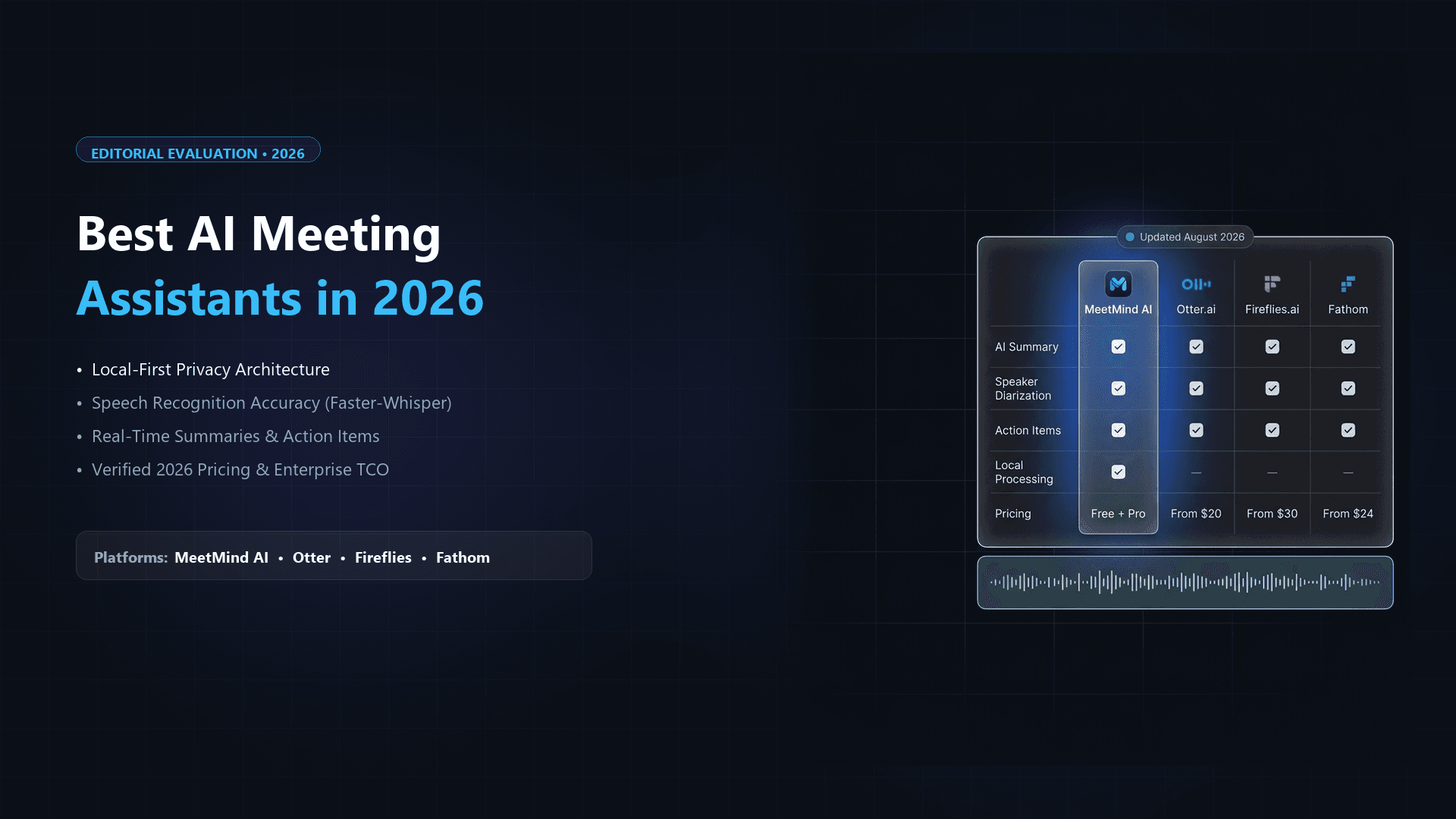
| Application | Core Strength | Ideal User | Bot Style |
|---|---|---|---|
| Fireflies.ai | CRM Integrations | Sales & Revenue Teams | Calendar Bot (Fred) |
| MeetMind AI | Privacy & Extraction | Consulting, Legal, Execs | Asynchronous (No Bot) |
| Fathom | Zoom Native UI | Freelancers & Solopreneurs | Native Zoom App |
| Otter.ai | Live Transcription | Students & Journalists | Calendar Bot |
| MS Copilot | M365 Ecosystem | Fortune 500 Enterprises | Native Teams Integration |
| Read AI | Sentiment Analysis | HR & Team Managers | Calendar Bot |
| Notion AI | Workspace Synthesis | Startups | Text Processing Only |
Best Tools by Specific Use Case
- Best for Engineering Standups: MeetMind AI or Notion AI (due to highly structured extraction capabilities that easily port to ticketing systems, following best practices for AI summaries).
- Best for Sales Discovery: Fireflies.ai (pushes everything straight to Salesforce).
- Best for Solo Consultants: Fathom (free, unintrusive on Zoom).
- Best for Highly Regulated Industries: MeetMind AI or MS Copilot (strict compliance, privacy-first architectures).
The Privacy Reality: What You Need to Know
When choosing an AI tool, privacy is not a feature; it is a liability constraint.
A common mistake companies make is adopting a free or cheap tool without reading the Terms of Service. Many lower-tier tools subsidize their free models by utilizing your meeting audio to train their proprietary machine learning algorithms. If you are discussing Q3 financials, unreleased source code, or patient health data, this is a catastrophic compliance breach.
Always look for vendors that explicitly state they use enterprise APIs with strict data retention controls for their LLMs. Tools like MeetMind AI prioritize privacy-first local transcription so that your data is encrypted, processed ephemerally, and instantly deleted from the LLM provider's servers, ensuring it is never used for model training.
Pricing Comparisons: Beware the "Seat" Trap
When budgeting for AI meeting software, look closely at the billing structure.
Many apps advertise a low monthly cost (e.g., $15/month), but that is per seat. If an engineering team of 20 people wants access to the automated summaries, you are suddenly paying $3,600 a year.
Furthermore, many vendors enforce strict monthly limits on transcription minutes. If your team exceeds 1,000 minutes of meetings in a month, you hit a paywall. When evaluating costs, always calculate the Total Cost of Ownership (TCO) for your entire team's usage, not just the advertised baseline price.
Common Implementation Mistakes
Rolling out AI note-taking software requires behavioral changes, not just technical deployment. Avoid these common operational traps:
- The "Silent Bot" Protocol: Never let a bot join a client meeting without warning. Always announce, "I use an AI tool to take notes so I can focus on our conversation." Clients almost universally appreciate the transparency, but they hate discovering a recording bot lurking in the participant list unannounced.
- The Digital Graveyard: Extracting action items is pointless if they stay inside the AI app's dashboard. If your team doesn't build a Zapier connection, webhook, or native integration to push those tasks into your actual project management software, the tool will be abandoned in three months.
- Trusting the Output Blindly: AI hallucinates. Check our Gemini vs ChatGPT comparison for details on model-specific error modes. If a summary states that a client agreed to a $50,000 budget, scrub the transcript or listen to the audio to verify the exact phrasing before drafting the contract.
Frequently Asked Questions
Do these apps work with multiple languages?
Yes. Modern underlying ASR engines (like Whisper) are trained on massive multilingual datasets. The top-tier apps can accurately transcribe Spanish, French, German, and dozens of other languages, and often translate the summary directly into English.
Do I have to record video to get a summary?
No. Almost all AI meeting assistants operate purely on audio streams. While some tools (like Read AI) can utilize video for visual sentiment analysis, it is completely optional. Audio is the only requirement for transcription and summarization.
Are AI note-takers legal in two-party consent states?
Yes, provided you obtain consent. In jurisdictions requiring two-party consent, you must explicitly inform all participants that the call is being recorded and transcribed. Most enterprise tools can be configured to play an automated audio disclaimer when they join a call to ensure legal compliance.
Final Recommendation
There is no single "best" AI note-taking app. There is only the best app for your specific workflow.
If your entire company lives inside Salesforce, Fireflies is your best bet. If you are a solo freelancer managing Zoom calls on a budget, Fathom is unbeatable.
However, if your organization prioritizes deep, accurate extraction of complex decisions, and you require the absolute highest standard of data privacy without intrusive bots joining your calls, MeetMind AI offers the most secure, architecturally sound solution on the market.
By defining your actual operational bottlenecks first, you can look past the hype and choose a tool that truly saves your team hours of administrative work every week.

Written by Abhishek
I created MeetMind AI to eliminate manual note-taking and ensure teams never lose critical decisions or action items after a call. All technical content is verified against our current codebase.
Read Founder ProfileReady to eliminate manual meeting notes?
Secure your meeting data while generating accurate AI summaries in minutes.
- AI Meeting Notes & Summaries
- Automated Action Item Tracking
- Search Across Every Meeting