Table of Contents
Executive Overview
Feeding raw, unprocessed audio directly from a browser or mobile device into a Speech-to-Text (STT) model is a recipe for high Word Error Rates (WER) and inflated cloud bills. AI transcription models like Whisper and Deepgram are highly optimized for specific acoustic parameters; deviating from these parameters forces the model to expend compute cycles interpolating data rather than transcribing speech.
Effective audio preprocessing acts as a crucial middleware layer. By applying deterministic Digital Signal Processing (DSP) techniques—such as sample rate normalization, mono conversion, and Voice Activity Detection (VAD) gating—engineering teams can slash transcription costs by 40% and improve accuracy by up to 15%. This guide details the essential preprocessing pipeline required before hitting any STT API.
1. The Physics of the Model: Understanding Sample Rates
Every STT model is trained on audio possessing a specific sample rate, almost universally 16 kHz (16,000 Hz).
Why 16 kHz?
Human speech occupies a frequency band roughly between 300 Hz and 3,400 Hz (the traditional telephony band), with fricatives and consonants extending up to 8,000 Hz. According to the Nyquist-Shannon sampling theorem, to accurately reconstruct a signal, you must sample at twice its highest frequency. Therefore, a 16 kHz sample rate perfectly captures all the acoustic information necessary to distinguish human speech (up to 8,000 Hz), while discarding higher-frequency noise (like the clash of cymbals or high-pitched hums) that only serves to confuse the model.
The Downsampling Imperative
Modern devices natively record audio at high fidelity: browsers often default to 44.1 kHz (CD quality) or 48 kHz (DVD quality).
If you send a 48 kHz file to the Whisper API, the model's inference engine must dynamically downsample the file to 16 kHz in memory before processing it. This wastes GPU compute and increases latency. Worse, if you are paying for API egress or running a local container, sending a 48 kHz file means transmitting 3x more data over the wire than necessary.
Best Practice: Always utilize FFmpeg or the Web Audio API to strictly downsample audio to 16 kHz before network transmission.
# Example FFmpeg command for 16kHz downsampling
ffmpeg -i input_meeting.mp4 -ar 16000 -c:a aac output_16k.m4a
2. Channel Mixing: The Mono Conversion Rule
Stereo audio (2 channels) is standard for music, but it introduces severe complications for STT models.
The Problem with Stereo
Most neural network acoustic models expect a single, one-dimensional array of audio amplitudes (Mono). If you pass a stereo file, the API wrapper must merge the channels. However, if the left channel contains a speaker and the right channel contains background noise (e.g., from a poorly configured spatial microphone setup), a naive algorithmic merge will pollute the speech signal.
Furthermore, if you pass a 2-channel file to an API that bills by the minute, some providers will interpret this as two distinct streams of audio, inadvertently doubling your transcription cost.
Downmixing to Mono
Converting stereo to mono (downmixing) ensures the model receives exactly what it expects.
Best Practice: Enforce a strict 1-channel policy in your ingestion pipeline.
# Example FFmpeg command for Mono conversion (-ac 1)
ffmpeg -i input_stereo.wav -ac 1 mono_output.wav
The Exception: Independent Channel Processing
The only scenario where stereo audio is beneficial is if you have hardware that records speakers on completely isolated tracks (e.g., Speaker A on Left, Speaker B on Right). In this specific case, you should split the stereo file into two separate mono files, transcribe them independently, and merge the resulting JSON transcripts based on timestamps. This bypasses the need for algorithmic diarization entirely.
3. Silence Truncation and Voice Activity Detection (VAD)
Transcribing silence is the single biggest waste of capital in an STT pipeline. In a typical 60-minute meeting, over 15 minutes consist of dead air, pauses, or breathing.
The VAD Gating Strategy
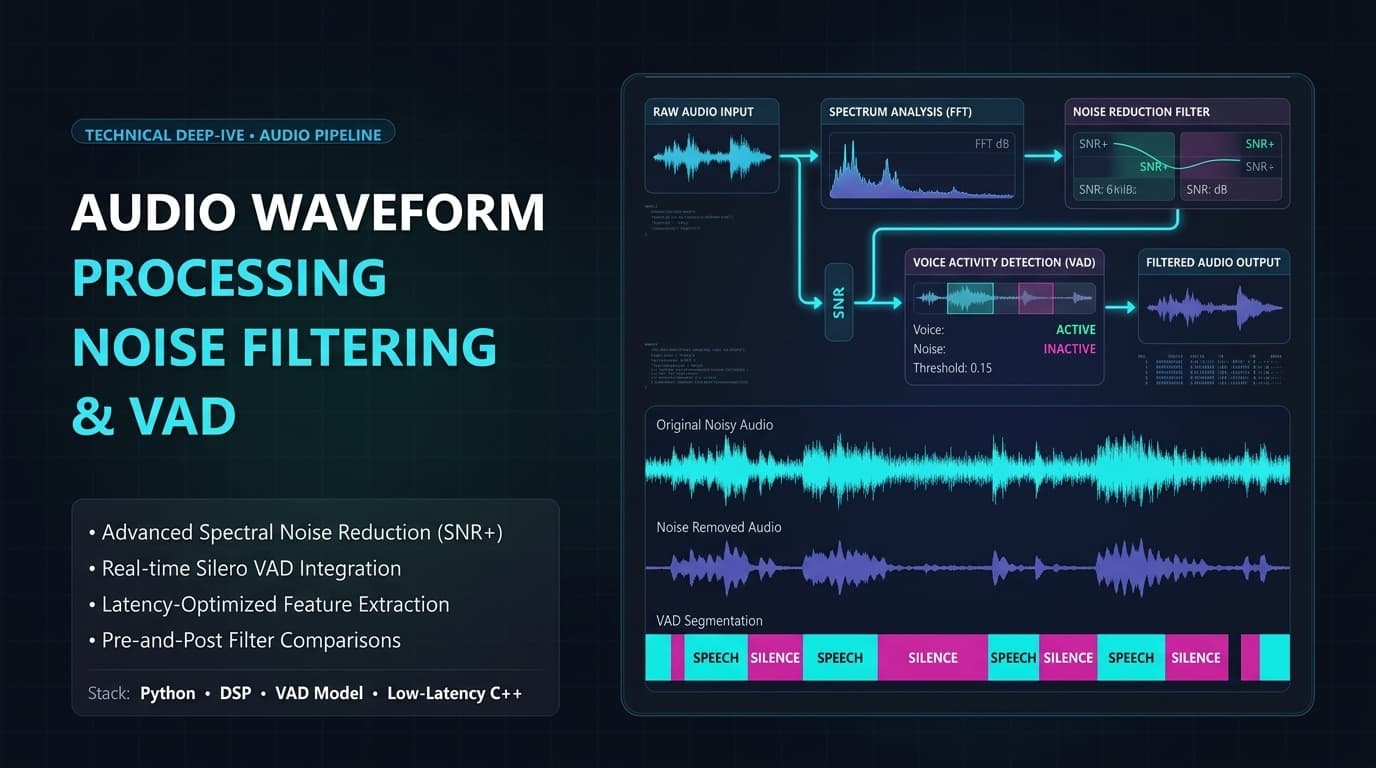
Voice Activity Detection (VAD) models are lightweight, CPU-bound algorithms designed to do one thing: determine if a 30ms frame of audio contains human speech.
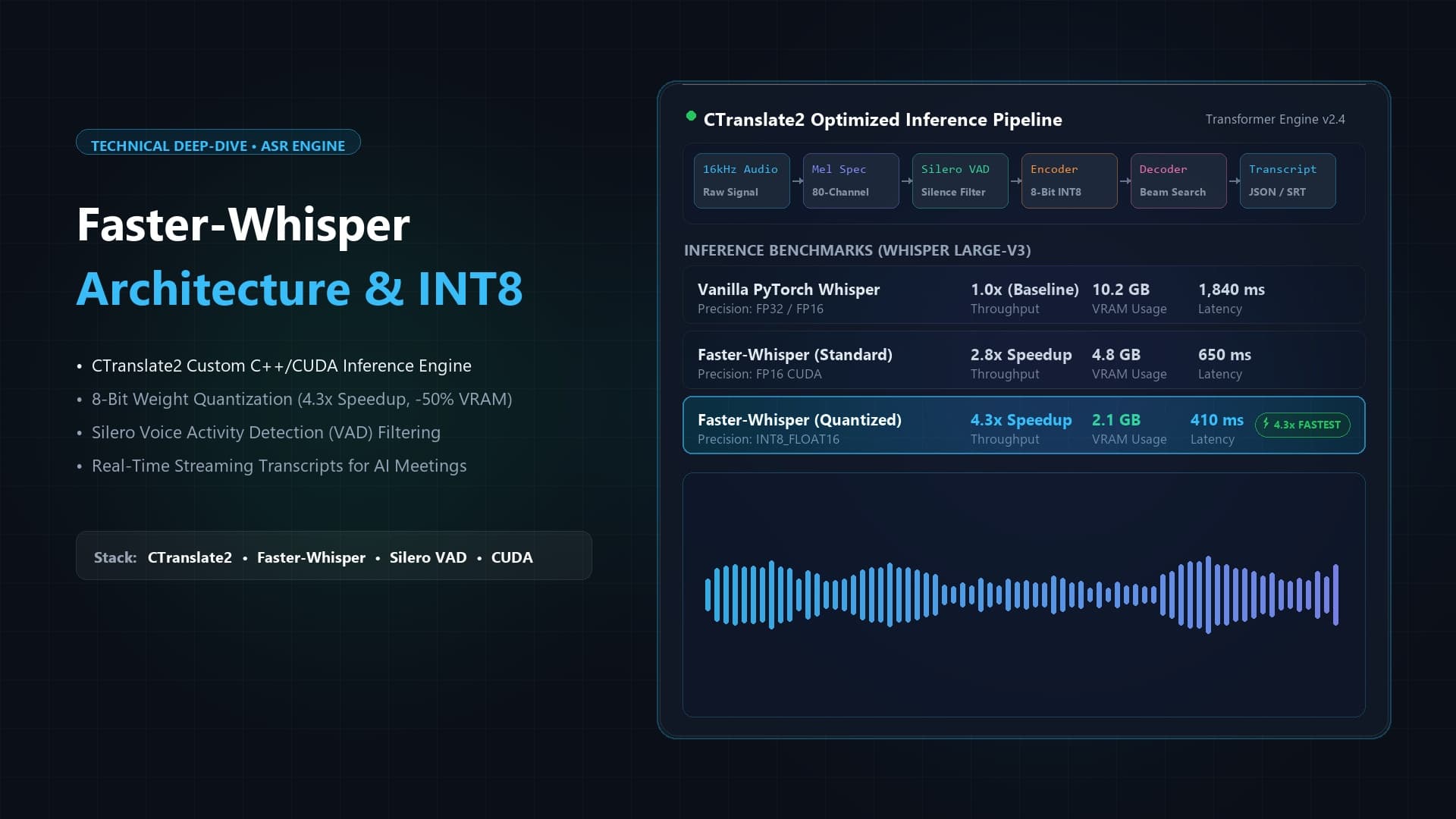
By running a VAD model (like Silero VAD or WebRTC VAD) across your audio file before hitting the expensive STT API, you can actively slice out periods of silence.
The Workflow:
- Pass the 16kHz Mono audio through Silero VAD.
- The VAD outputs probability thresholds for speech.
- If the probability drops below 0.3 for more than 1.5 seconds, mark it as silence.
- Truncate the silence, preserving the original timestamps in a metadata map.
- Send the dense, concatenated "speech-only" file to the STT model.
This strategy can reduce your API bill by 20–30% and significantly reduce the likelihood of the STT model hallucinating words during long stretches of background noise.
4. Noise Reduction and Audio Normalization
While VAD handles silence, dealing with active background noise (HVAC systems, keyboard typing, traffic) requires Digital Signal Processing.
AI Noise Suppression vs. Traditional DSP
In the past, engineers relied on traditional DSP filters (like high-pass filters to cut rumble below 80 Hz). However, aggressively applying traditional noise gates often distorts the human voice, introducing "metallic" or "underwater" artifacts. STT models perform drastically worse on distorted, heavily filtered audio than they do on audio with natural background noise.
Best Practice: Do not apply heavy algorithmic noise reduction before an STT model. Models like Whisper are explicitly trained on noisy data and use context to infer words through the noise.
Audio Normalization (Loudness)
What you should fix is amplitude variance. If Speaker A is shouting into their microphone and Speaker B is whispering 5 feet away, the STT model may fail to trigger on Speaker B's quiet phonemes.
Applying an audio normalizer (like FFmpeg's loudnorm filter) balances the amplitude of the entire track, bringing quiet speakers up and loud speakers down to a consistent LUFS (Loudness Units relative to Full Scale) target, typically around -16 LUFS.
# Example FFmpeg command for EBU R128 Loudness Normalization
ffmpeg -i raw_audio.wav -af loudnorm=I=-16:TP=-1.5:LRA=11 normalized.wav
5. How Modern Platforms Automate Preprocessing
Building and maintaining this FFmpeg/VAD pipeline is a massive engineering undertaking, often requiring dedicated microservices for asynchronous media processing.
The MeetMind AI Approach
Platforms like MeetMind AI abstract this complexity away. The preprocessing layer is handled directly at the edge or within the browser via WebAssembly (Wasm).
- In-Browser Processing: When capturing audio from a Zoom call, MeetMind's client-side SDK utilizes the Web Audio API to natively capture audio at 16kHz Mono, preventing unnecessary data transfer over the network.
- Edge VAD: As audio buffers reach the server, a lightweight Rust-based VAD immediately evaluates the chunks, dropping silence before it ever touches the GPU queue.
- Dynamic Normalization: EBU R128 loudness normalization is applied on-the-fly to ensure the transcription engine receives pristine, balanced acoustic data.
By integrating these preprocessing steps transparently, the platform guarantees maximum accuracy and minimal latency without requiring the end-user to manage complex FFmpeg binaries.
Frequently Asked Questions
Will sending a 320kbps MP3 improve transcription accuracy over a 64kbps Opus file?
No. High bitrates benefit music fidelity but offer diminishing returns for speech. STT models operate on mel-spectrograms derived from the audio. A 64kbps Opus or AAC file perfectly preserves the necessary acoustic frequencies for human speech. Higher bitrates only increase upload time and storage costs.
Should I compress the audio before uploading to the API?
Yes. Never upload raw WAV or PCM files unless operating entirely on a local network. Always encode the 16kHz mono audio into a highly efficient codec like Opus or AAC (m4a). This dramatically reduces upload latency, resulting in a faster Time-to-Transcript for the end-user.
Does background music ruin transcription?
Yes. STT models struggle significantly with background music, especially if it contains vocals. The model cannot distinguish between the primary speaker and the vocal track of the music, resulting in a scrambled, hallucinated transcript. If your audio contains music, you must use a Source Separation model (like Demucs) to isolate the vocal stem before transcription.
What is the ideal format for Whisper APIs?
The most highly optimized payload for OpenAI's Whisper API is an M4A file (AAC codec), downmixed to Mono, sampled at 16,000 Hz, with a bitrate of roughly 64 kbps. This provides the perfect balance of acoustic clarity and minimal file size.

Written by Abhishek
I created MeetMind AI to eliminate manual note-taking and ensure teams never lose critical decisions or action items after a call. All technical content is verified against our current codebase.
Read Founder ProfileReady to eliminate manual meeting notes?
Secure your meeting data while generating accurate AI summaries in minutes.
- AI Meeting Notes & Summaries
- Automated Action Item Tracking
- Search Across Every Meeting